Duplicate and modify a size table
What is the size table modification mechanism?
This is through the side list -> then Measurements table -> then Measurements tables library -> then reach the wanted table
1- In case you want to modify the name -> edit it and press updating data -> then updating table data

2- In case you want to change the picture -> add a new one and press updating data -> then updating table data
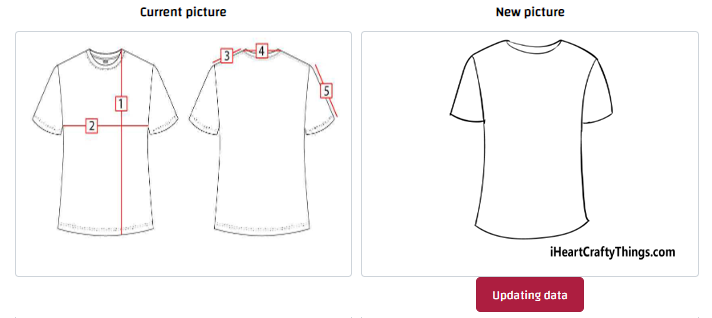
3- In case you want to add a measure parameter or size -> it can be easily added and press updating table data
4- In case you want delete a measure parameter or size -> press x then updating table data
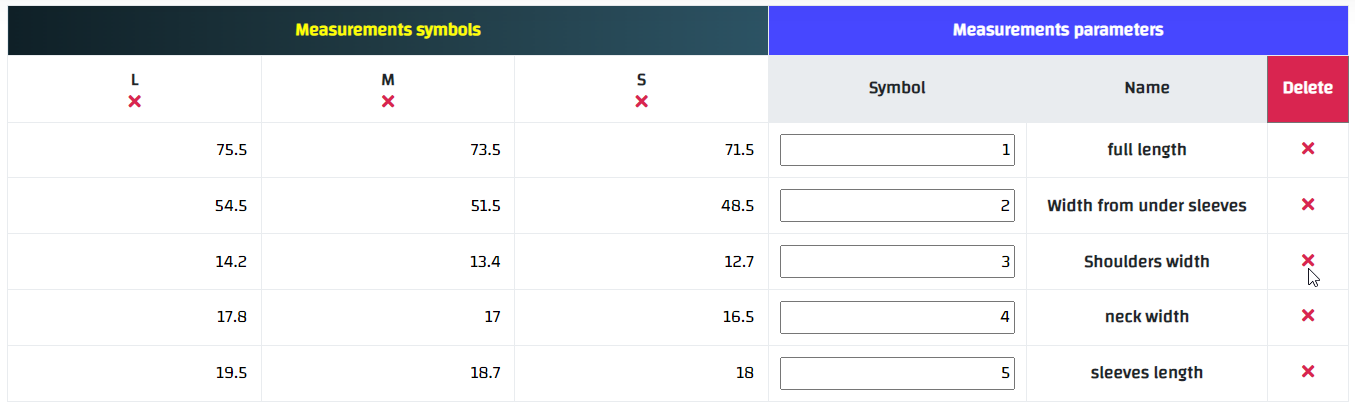
If one of the measurement parameters or one of the sizes has been deleted by mistake, it can be returned by refreshing the page before saving without pressing updating table data , as pressing Updating Table Data will make the deletion cannot be undo
How to duplicate a size table?
In case you want to add a new measurements table that is similar to a previously existing table, but with some differences, it can be easily added by repeating the existing table, modifying it, and adding it as a new measurements table.
1- This can be done through the side list -> then Measurements table -> then Measurements tables library
2- Then scroll down the page till you reach the measurements tables library, or search the table and the data will appear as follows:-

3- Then press modify button, modify what you need (such as: changing the name or image or adding a size … etc.)
4- Then press updating the table data as a new table in case of successful operation, a message will appear (Success), and the new size table will be added with a new code